


What changes after setup.
What you get
You sound like you again.
AI does the typing. Your stories, your opinions and your way of saying things lead every post, so readers know the post is yours before they reach your name.
Your week is ready before you sit down.
Instagram, LinkedIn and Facebook posts arrive planned and drafted, and the hours go back to the work only you can do.
Your audience and your details belong to you.
Your brief and photos sit in your own Notion workspace, read by your AI only when you ask. Your website, email address and email list are yours too, so losing a social account never loses your audience.
Straight answers.
Before you buy
Choosing when and how to use AI is part of running a business. The Content Atelier keeps that choice in your hands, and your voice in every draft.
Will your posts still sound like you?
Yes. Your posts and your website start from your photos, your words and your colours.
Without a system
- Explaining your business to AI from scratch
- Posts that could belong to anyone
- A different voice on every platform
- Facts you have to check twice
- Marketing squeezed into late nights
With The Content Atelier
- Your own phone photos, edited to your brand
- Your words, and a list of the words you never use
- Your colours and fonts, set once
- Every draft checked before you see the draft
- Only the true details you wrote down


Is it easy?
Yes. If you can copy and paste, you can run The Content Atelier.
- 01
Copy
One click copies the dashboards into a free Notion account.
- 02
Paste
Paste one prompt into the AI you already use. Your first draft comes back in the same chat.
- 03
Approve
Change any line you want. Nothing goes out until you say yes.
Your website works the same way
- 1Ask your AI for a page
- 2Read the draft
- 3Mark the page Ready
- 4Drag one folder into Cloudflare
No code. Stuck on a step? The help desk inside every dashboard gives you a numbered fix.
Who this is for. Built for founder-led businesses that sell a service, a product or both, and post on more than one platform in one voice.
Selling products?
Switch The Brand Input to products, and every draft follows. Collections take the place of offers. Reviews and stockists take the place of client results. Launch, restock and sold-out posts arrive drafted, with the product page copy and the email after each order.
Shown here with Quarry & Linen, an invented label every copy ships with as an example.
- Launch postEXAMPLE: The Harbour shirt is here. Washed linen, cut long, made in a run of 60.
- Restock postEXAMPLE: The sand Harbour shirt is back, sizes 8 to 14.
- Email after an orderEXAMPLE: Your Harbour shirt left the studio this morning. Wash it cold the first time, and it softens by the third wear.
Everything The Content Atelier does for you, task by task.
What you receive
Your part
Fill in one brief about your business once, then approve the drafts.
Your AI's part
Plan, write, design and score the posts, then file the results back into your dashboard.
A look inside
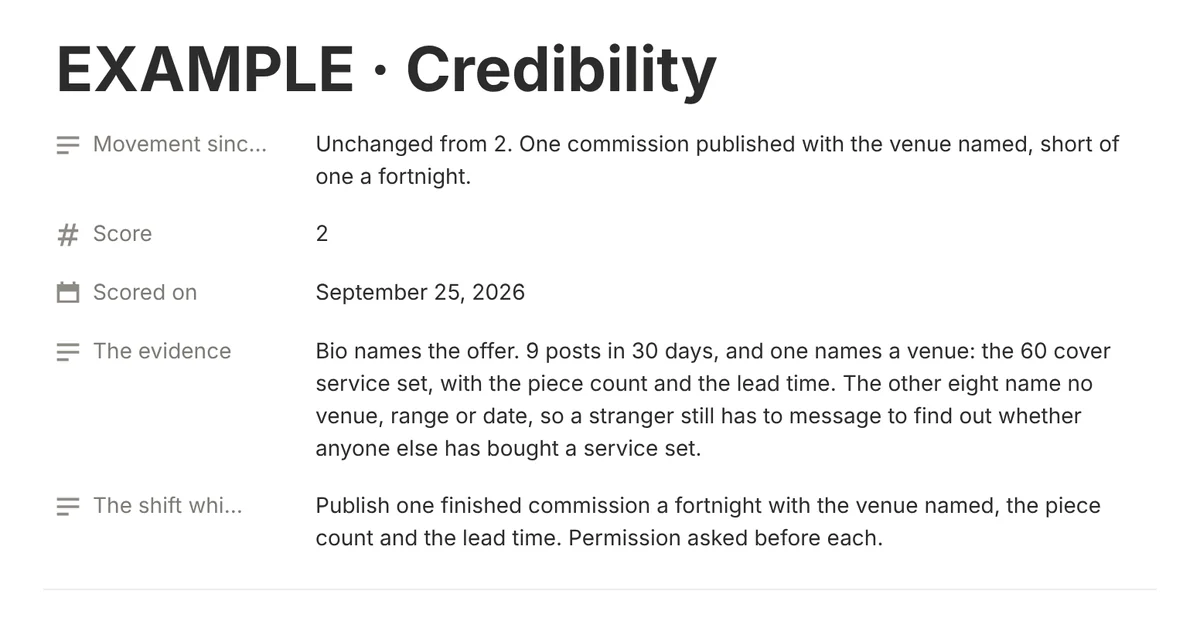
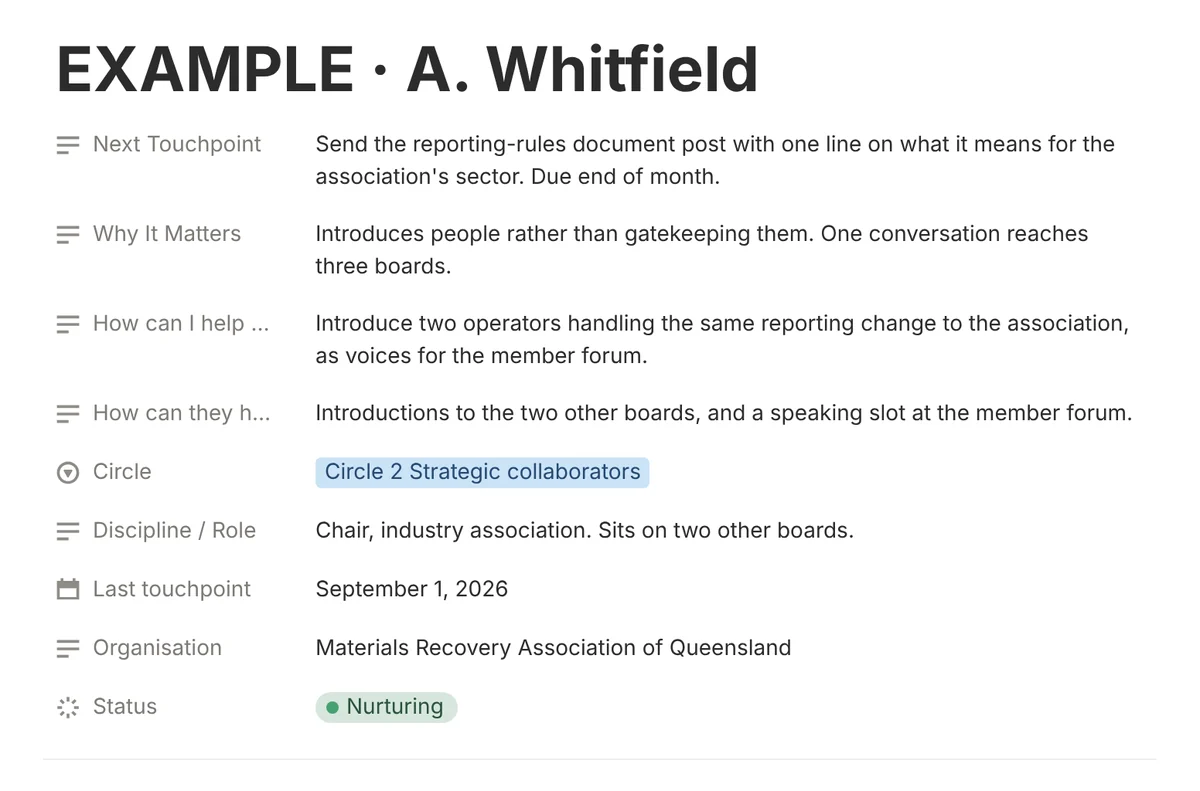
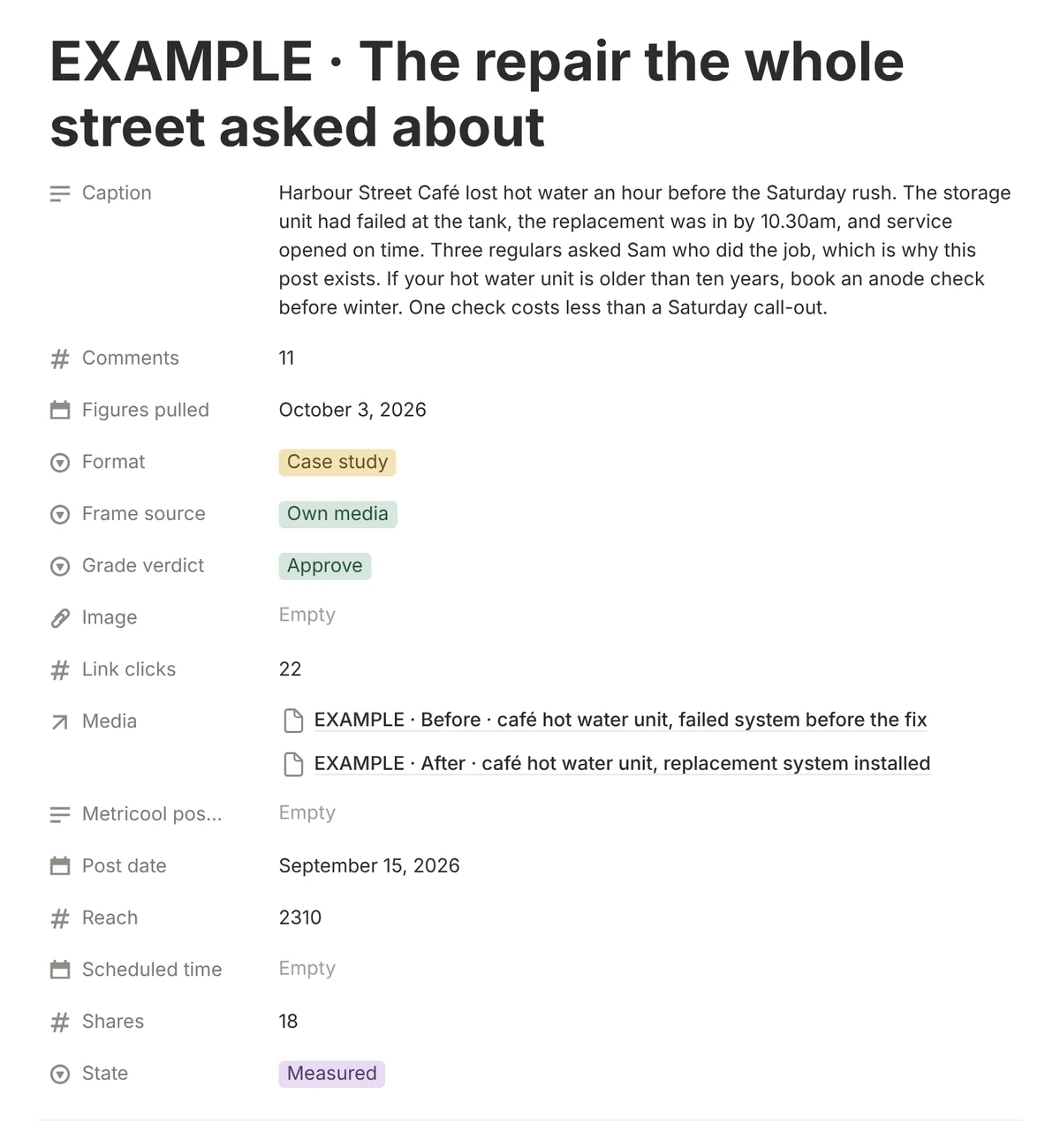
Real screens from The Content Atelier, shown with the example rows every copy ships with, so you see the finished standard before you buy.
Everything inside The Content Atelier
Create: your month planned and every post written in your voice
The Founder Brief, for Instagram
A designed week of posts and a monthly score of the five things your brand is judged on.
LinkedIn Credibility, for LinkedIn
Weekly posts, a record of who you know and results ready to quote.
The Local Business Toolkit, for Facebook
Posts that bring in enquiries, with replies and follow-ups drafted.
The marketing plan
Seven lines that tie every platform to one goal.
The Accession File
Your 90-day plan, written by your AI from your Brand Input, so every week has a clear aim.
First Edition
A launch post set, opening with an introduction post built from your own interview answers.
The Brand Input
The short brief about your business that every dashboard reads first. Included free.
The Brand Charter
The belief your business stands on and the words your customers repeat back, filled in from your brand interview.
The Prompt Vault
Finished prompts sorted by task, ready to paste into any AI. Included free.
Reddit, Bluesky and Threads
One weekly comment task for Reddit, Bluesky and Threads.
Edit: your own photos and footage edited to brand
Media Bank
Your AI edits your own photos to brand and keeps the originals safe.
One photo, nine shots
Turn one of your photos into nine fresh angles and close-up details, each cut and ready to post. An optional extra, run on the image model you choose.
Create, Film and Edit
A voiced filming training and a printable filming checklist, for five clips filmed on your phone and shaped into one story your video editor can cut.
Footage intake
Share your phone clips with your AI, and every clip worth keeping gets a name you can search, a folder and a matching post.
Check: every draft tested against your rules before you see it
The combined verdict
One monthly verdict across every dashboard.
The CMO desk
Every Friday your AI reads your numbers, names the one step losing you sales, and sets the week's one move.
Your money dashboard
One page your AI builds from your checkout, ads and email, showing which post, ad or email made a sale and what your content system costs to run.
Signature Architecture
The four things your brand is recognised by, scored post by post. Included free.
Writing Like a Person
The voice standard that keeps every draft sounding like you. Included free.
Time back: set up once, then the repeat work runs on a timetable
One setup prompt
Fills every dashboard from a single interview about your business.
Day One Drill
Your first week in seven short steps, ending with your first post scheduled.
The 48 Hour Build
Setup finished in seven short stages across two days, with a clear finish line.
Works with your AI
On Claude, one uploaded file opens the right task when you ask. On ChatGPT, Gemini or Copilot, the same tasks run by copy and paste.
The help desk
Stuck? The help desk, a page inside the dashboard, holds a prompt that gets your AI to give a numbered fix. Spare parts, a section kept apart from your working pages, hold a clean copy of every page.
The Improvement switch
Your dashboard sharpens with use. Each week your AI reads what your posts earned and suggests sharper openings, angles and posting times. Ask for a new feature in plain words, and your AI builds the feature once you approve. Every change can be undone.
The Reading Room
The questions buyers ask, already answered, so a snag takes minutes to fix on your own.
The Finding Aid
A library of AI products for social media and content, sorted by the task each product does.
Your AI team
Your scheduled tasks named as roles, with a weekly Chief of Staff review and an inbox and money desk.
Yours to own: only in the bundle
Your own website
Written from your own records and kept current by your AI. Setup runs once, guided step by step, on a free Cloudflare account and a domain name you own.
An email address at your own domain
Mail sent from your business name rather than a free inbox.
Your email list
The sign-up form, the list and a three-email welcome sequence, set up by your AI from your answers.
Google Business Profile
Weekly updates, drafted replies to reviews that thank you, talking points for complaints and a monthly profile check.
Paid Advertising
Facebook and Instagram ads planned, built and checked by your AI, every campaign created paused until you say go.
Creator Partnerships
Bring creators in without the guesswork. Creator Partnerships shortlists the creators you are weighing, writes each brief and tests every paid or gifted post for a clear ad label before the post goes live.
The Press Room
Find stories worth telling, answer journalists' requests and track every pitch, all in your own words. Journalists trust pitches written by people. The Press Room does the research, and you write the words.
The Event Room
One prompt plans your event launch, from the event page to the last reminder email.
Found in search and AI answers
A monthly check that your site shows up on Google and reads right to ChatGPT, Gemini, Copilot and Claude, with every fix waiting on your approval.
The Skills Set
Skills your AI loads the moment a question needs one.
Your own AI fills your calendar with verified industry days and post ideas.
Bonus: the Content Calendar
Paste one prompt into your AI each month. Your AI fills a visual calendar with the industry days, awareness days and public holidays for your industry and your region. Each day is confirmed by the day's own organiser or by a government, and arrives with one post idea placed on a posting day on LinkedIn, Instagram or Facebook close to the date, before it wherever the month allows.
Every day on your calendar comes with a source.
Any day your AI cannot confirm waits on your Unverified list for you to check. Add a source, tick Verified and run the monthly prompt again, and that day gets a post idea.
You set your industry and your region.
Your AI never assumes a country, so the public holidays on your calendar match where your customers are.
One calendar covers your LinkedIn, Instagram and Facebook posts.
The starting plan is one company page post a week on LinkedIn, two brand account posts a week on Instagram and one personal profile post a week on Facebook, and you change any number at any time.

The method · Made to Measure
Your voice, measured once, then fitted to every post.
The Brand Input is the single intake for the whole range: what you sell, who each offer is wrong for, three proofs, a ten-entry bank of true details only you hold, the platforms you publish on, the four things your brand is recognised by, and your hard limits. Every dashboard reads it before it writes anything.
Paste a prompt into Claude, ChatGPT, Gemini or Copilot, or connect Notion so your AI opens The Brand Input itself. Either way, your AI works from your own record rather than generic best practice. One prompt runs the interview and fills the dashboards from your answers.
Every dashboard cuts each post to that measure. Every edit you make in the dashboard tightens the fit for the next draft.
Stop sounding like everyone else's AI.
The difference
A plan that learns from your results.
Each post is scored on evidence from your own account, and next month's plan changes with the results.
Not another subscription.
One payment. The dashboards are copied into your own Notion workspace and stay yours.
Every image of you starts with photos you choose.
No stranger’s face, and no likeness invented by a model.
What the voice check catches
Every draft is checked for signs of AI before the draft reaches you. One line, before and after, for a made-up physio clinic.
“In today’s fast-paced world, your wellbeing deserves a seamless journey. Ready to unlock your best self?”
Caught: wording any business could post, with no real detail.
“The 7am Tuesday slot fills first, because that is the hour before school drop-off. Kestrel Bend Physio keeps that slot for returning clients.”
Before you buy.
Questions
I have never used Notion. Can I still set the dashboard up?
Yes. You need a free Notion account, and the dashboard copies into your workspace in one click. The 48 Hour Build, included free, walks the setup in seven blocks across two days with a clear finish line.
Which AI works best?
The AI you already use: Claude, ChatGPT, Gemini or Copilot. Every dashboard also carries a ready-made Claude Skill, uploaded to Claude once, so Claude opens the right task the moment you ask.
What else will I pay for?
Nothing required. Notion stays free, Instagram and Facebook schedule through a free Metricool account, and LinkedIn's own free scheduler takes each approved LinkedIn post you paste in. A paid Metricool plan is optional, for your AI to load LinkedIn drafts into a scheduler for you. Generating images or video is an optional upgrade, charged by the model you pick, and each dashboard names that cost where the step comes up. Scheduled runs depend on your AI plan, and each AI company states which plans run tasks on a schedule: Claude, ChatGPT, Gemini, Copilot.
Does the work run on its own, or do I start each task?
Both, by your choice. Each task runs by copy and paste whenever you ask, or on a schedule where your AI plan runs scheduled tasks. How a post goes live stays your choice too: approve to draft, approve to release, or switch on auto-publish once you trust the drafts. Every Page or brand account post reaches your scheduler as a draft you release, and a personal profile post your scheduler cannot reach arrives ready to paste.
What if my AI changes?
Your brief, your records and every prompt stay in your own workspace as plain text, so a new AI connects to the same dashboard and carries on.
Does this work with a small audience?
Yes. Each post is scored on evidence from your own account, and the monthly read works from the posts you published that month.
My AI already includes small business marketing skills. What does this add?
Three extras on top of a general marketing skill: a method built for one platform rather than one calendar across every channel, a score on every post with the evidence quoted, and the choice of AI, since the dashboard runs on Claude, ChatGPT, Gemini or Copilot.
Do I need to pay for an AI?
Every prompt works on a free AI plan by copy and paste. Letting your AI open the dashboard by itself needs the Notion connector, and each AI company sets which plans include the connector, so the dashboard links each company's own page.
What if I get stuck during setup?
Open the help desk page, paste the help desk prompt into your AI, add the page you were on and what happened, then follow the numbered fix. If a page stays broken, restore the clean copy of that page from the spare parts section of the dashboard in three steps or fewer.
What do I get after I buy?
Every dashboard as released on the day you buy, copied into your own Notion workspace to keep.
Can I get a refund?
A purchase is refunded in full within 7 days, as long as no dashboard on your access page has been opened or duplicated. The access page records the first time a dashboard link is opened, so the check needs only your order number. Your rights under Australian Consumer Law always apply. The full terms sit on the refunds page.
Product release
The Content Atelier
Content operating system for scaling founders and operators. Four AI dashboards and The Skills Set, writing in one voice from one brief. One payment, yours to duplicate and keep.